
Independent information guide · Not the official operator
Tashan Win Download: APK Checks, Updates and Installation Help
Before downloading Tashan Win, confirm who published the app and whether the file is intended for your device. A familiar logo and a large download button do not answer those questions.
A publisher-verified APK source, current version number and supported Android requirements are not established in this guide. The sections below explain how to assess a download offer, understand installation problems and avoid losing access to an existing account.
What Should a Download Page Tell You?
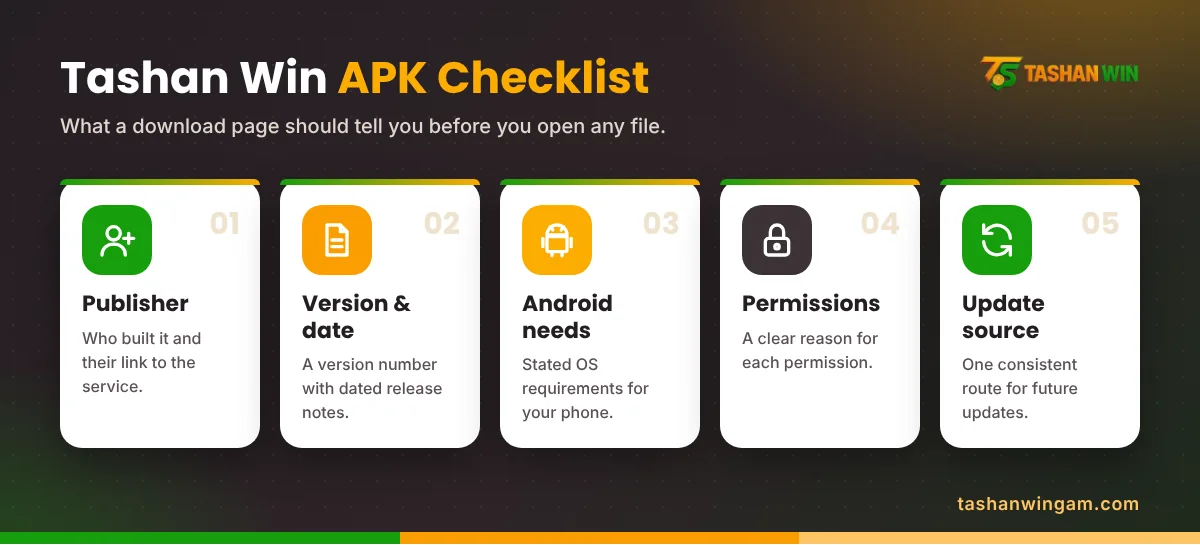
A useful Tashan Win APK download page should identify the publisher, release version, update date and device requirements. It should also explain where updates come from and what changed in the latest release.
Treat a page cautiously if those details are missing or contradict one another. An old article with “latest version” added to its heading does not prove that its file is current.
Before downloading, check:
- Whether an identifiable publisher provides the file.
- Whether the download destination matches the stated source.
- Whether version information is consistent across the release notes.
- Whether device requirements are documented.
- Whether privacy terms explain the permissions requested.
A file name containing the game’s name is easy to create. It cannot establish who built the software.
Check Android Compatibility First
Look in your phone settings for the Android version and available storage. Compare those details with the publisher’s documented requirements, if available.
Do not rely on an invented specification table. This guide does not claim a minimum Android version, file size or RAM requirement for the Tashan Win app.
Storage is also different from compatibility. Making more room may help an installation that lacks space, but it will not make an unsupported app compatible with your phone.
For iPhone and computer access, use the separate device guides. An Android APK does not establish an iOS or native desktop release.
How to Assess and Handle an APK Download
The following process applies only after the publisher, source and lawful availability have been established. It is not a recommendation of an unverified file.
- Review the app’s documented release details.
- Confirm the destination before starting the download.
- Let the transfer finish and check for a download error.
- Read any installation or security message carefully.
- Review permissions before deciding whether to proceed.
- Keep a record of the source and version for future support.
Keep Google Play Protect enabled. If it flags a harmful application, stop and investigate the source rather than following instructions to switch protection off.
Successful installation establishes that a file can run on the device. It does not establish the operator’s legitimacy, payment reliability or legal availability.
APK Not Installing: Match the Fix to the Error
The Download Is Incomplete
Check whether the browser reports a completed transfer. A connection failure can leave an unusable file.
If the verified publisher’s download has failed, remove the incomplete copy before retrying. Avoid collecting replacement APKs from unrelated websites.
The Phone Reports a Compatibility Problem
Recheck the stated operating-system requirements. Record the exact message instead of assuming that installation permissions are the cause.
A file built for a different device configuration may require a different release from the publisher. Repeated installation attempts will not change that requirement.
Android Shows a Security Warning
Read the warning in full. A harmful-app alert deserves a different response from a request explaining that installation from a particular source is restricted.
Do not treat every warning as an obstacle to bypass. Ask the publisher for an explanation that addresses the actual message.
Updating an Existing Installation
An update should come through a source whose connection to the publisher can be established. A message offering “new version support” through a private chat is insufficient.
Before making changes, confirm that you can recover the existing account. Save relevant account identifiers and unresolved transaction references.
Do not uninstall first simply because another article recommends it. Removing software can also remove locally stored information, while it may do nothing to resolve an account restriction.
Avoid older releases offered as fixes for withdrawal problems. App compatibility and payment processing are separate issues.
Permissions and Account Protection
Check what each requested permission is meant to do. Access to contacts, messages, files or accessibility controls needs a clear explanation.
Do not share a password, OTP or banking PIN with someone offering installation help. Decline requests to take remote control of your phone.
Indian readers also need to account for restrictions on online money gaming and related services. A downloadable file does not establish permission to use the underlying service.
Frequently Asked Questions
Where is the verified Tashan Win download link?
No publisher-verified download destination is established here. Confirm the operator and app publisher before trusting a file.
What is the latest APK version?
A current release number has not been verified. Use dated publisher documentation rather than an undated “latest” label.
Should I disable Play Protect to install the app?
Keep Play Protect enabled. Investigate warnings instead of dismissing them to complete an installation.
Will reinstalling fix a missing withdrawal?
Reinstallation does not establish or resolve a payment’s status. Preserve transaction records and follow the relevant payment complaint process.
Can I use the APK on an iPhone?
An Android APK is not an iPhone application. A separate, compatible release would need to be verified.
Before You Download
A dependable Tashan Win download decision starts with the publisher, documented requirements and file source. If those details cannot be established, leave the file unopened and protect your existing account records.